Square payments for WHMCS, with the card stored at Square
Accept credit and debit cards through Square, and let WHMCS charge renewals automatically — without any card data ever touching your server.
Card details are entered into Square's own hosted fields and exchanged for a token. WHMCS stores that token, the card brand, the last four digits and the expiry date. It never sees, transmits, or stores a card number. That keeps your install in PCI DSS SAQ A scope, and it works correctly with WHMCS local credit card storage switched off.
Renewals are charged as merchant-initiated transactions against the stored token, which is what makes unattended billing actually work — cron charges the card at 3am and nobody has to be present.
Sandbox testing is included, not just mentioned
Most gateways tell you a sandbox mode exists. This one ships the tooling to use it.
- A standalone test harness that runs the real module files against Square's live Sandbox API — no WHMCS install required. Useful for verifying a build before it goes near your billing system.
- 109 automated assertions covering currency conversion, webhook signature verification, single-use token handling, idempotency, the WHMCS module contract itself, and a check that the module contacts Square and nobody else.
- A browser harness that serves the genuine payment form locally so you can put a test card through the whole flow end to end.
- Documented test cards, including the specific values that force a CVV failure and an address-verification failure, so you can watch the error handling work rather than hope it does.
- Clear documentation of the sandbox/production boundary — including why a card stored in sandbox reports
NOT_FOUND in production, which is otherwise a genuinely confusing hour of your life.
Your customers are told what actually went wrong
A declined card and a failed connection are different events, and this module treats them as different events at the HTTP layer — separate exception types, so one can never be reported as the other.
When a payment fails, the customer is told the real reason from the issuer and what to do about it:
- "The security code (CVV) did not match. Please check the 3 or 4 digit code on your card and try again."
- "The billing address did not match the address your bank has on file. Please check it — especially the postal or ZIP code — and try again."
- "Your card does not have sufficient available funds for this payment. Please use a different card."
Around 60 Square error codes are mapped to specific, actionable wording. A configuration problem on your side is never phrased to the customer as a problem with their card — it tells them to contact you, and tells you what to fix in the module log.
The phrase "communications error" appears in exactly one place in the entire codebase: the path where the request genuinely did not reach Square. That is the only case where "please try again" is honest advice.
It does not fight your other gateways
Zero Composer dependencies. No bundled SDK, no bundled HTTP client, nothing to collide with another module's copy of the same library — and no coupling to WHMCS's own vendor tree when you upgrade.
Square's REST API is called directly over cURL. Twelve PHP files, no autoloader magic, no framework.
See it in action
Click either image to enlarge.
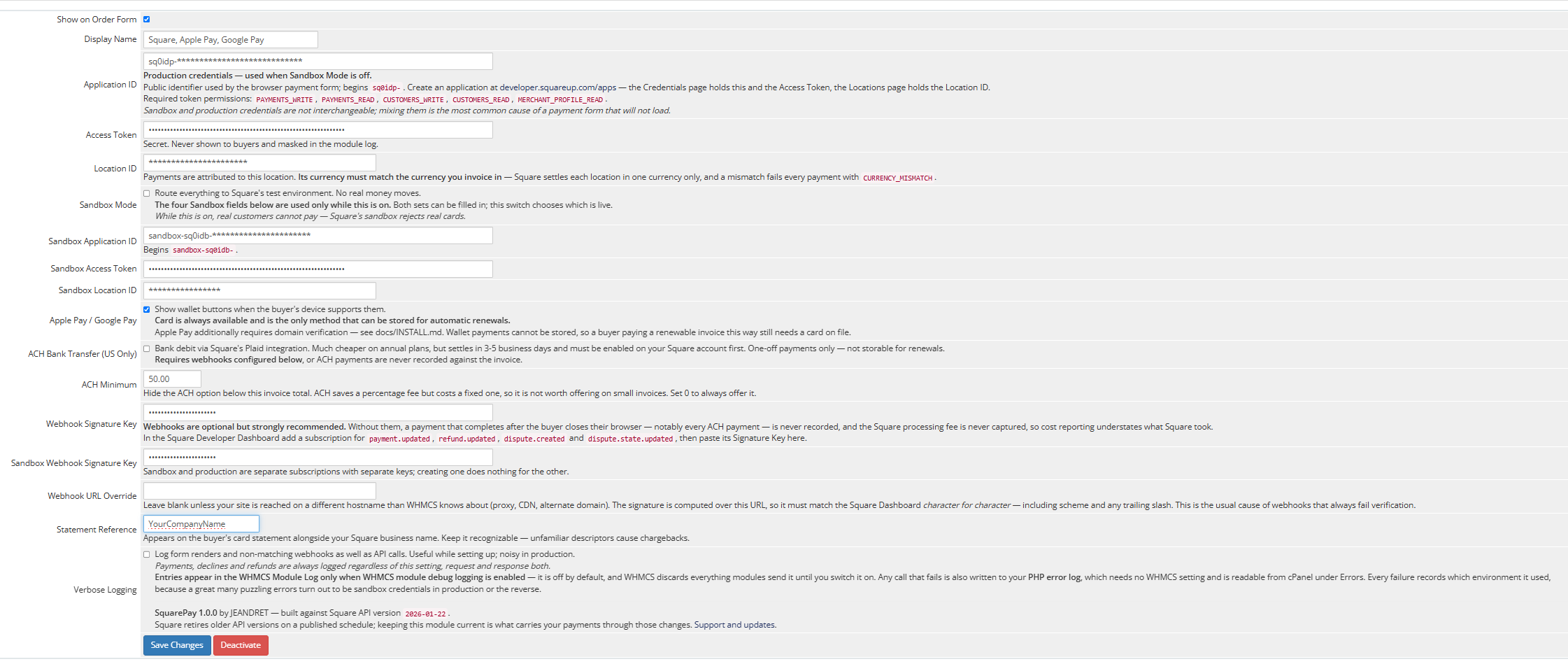 The SquarePay gateway settings in the WHMCS admin
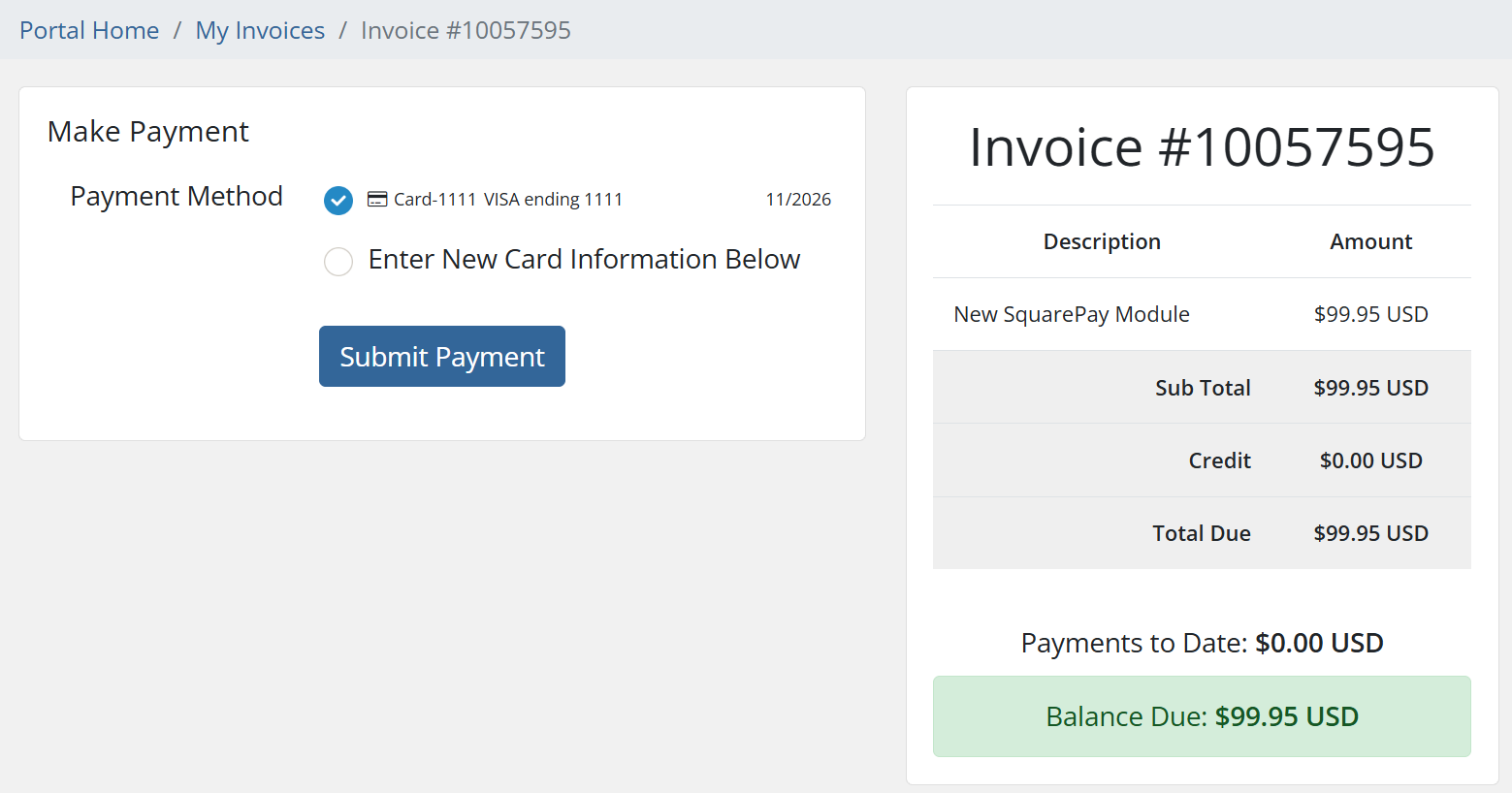 A stored card under a WHMCS client's Pay Methods
Features
- Card payments via Square's Web Payments SDK
- Tokenized card storage — automatic renewals with no card data held locally
- Apple Pay and Google Pay — one tap, no card entry. Both verified with live production payments, not just sandbox
- Full and partial refunds from the WHMCS admin area
- Strong Customer Authentication / 3-D Secure via buyer verification
- Webhooks for delayed settlement, dashboard-issued refunds and chargeback alerts
- Square's processing fee recorded against the transaction and backfilled at settlement, so your cost reporting reflects what Square actually took
- Every API call logged with both request and response, including AVS and CVV results — so "is our address verification working?" is a question you can answer from the module log
Requirements
| WHMCS |
8.x — verified on 8.13, the current Long-Term Support release |
| PHP |
8.1 through 8.4 — loads and runs on all four |
| Extensions |
curl, json, hash, mbstring |
| TLS |
HTTPS on your WHMCS domain — Square will not tokenize over plain HTTP |
| Square |
An account activated for card processing |
Square settles each location in a single currency. A multi-currency WHMCS install needs one configured gateway instance per currency.
What you configure
You will need your own Square application: an Application ID, an Access Token and a Location ID, from the Square Developer Dashboard. Sandbox and production credentials are entered separately and switched with a single toggle.
Webhooks are optional but recommended, and required if you enable ACH — an ACH payment settles days after the buyer has closed their browser.
Full setup instructions ship with the module, including Apple Pay domain verification and a troubleshooting section.
What it does not do
Stated plainly, because finding out after purchase is worse:
- Wallet payments cannot be stored for renewals. Google Pay produces a one-time token with no reusable card behind it, so a customer paying a renewable invoice that way still needs a card on file for automatic renewal. This is a Square constraint, not a module one.
- Apple Pay requires domain verification, which is a step you complete once on your own domain via the Square Developer Dashboard. Instructions are included. Until it is done, the Apple Pay button simply does not appear — deliberately, since a button that cannot complete is worse than no button.
- ACH ships but is not certified in this release. The code and configuration toggle are present, but the path has not been verified end to end, so it is off by default and not sold as a feature.
- One currency per gateway instance, per Square's own location model.
- Refunds settle asynchronously. Square accepts a card refund as pending and completes it over the following days.
- WHMCS 9.0 is not claimed. WHMCS 9.0 is generally available and 8.13 is the Long-Term Support release. The module calls six core WHMCS functions and touches no ORM, no query builder and no template engine, so its exposure to version changes is small — but 8.13 is what it has actually been tested on, and it is not sold as 9.0-compatible until it has been.
Support
$99.95 one time. Includes twelve months of updates and support. Further years are available at $39.95 when you want them — entirely optional, and the module keeps working exactly as it does today whether you renew or not. There is no license key, no phone-home, and nothing that expires.
30 day money-back guarantee. Install it, put real payments through it, and if it is not right for you, ask for a refund.
Support inquiries are answered within one business day, and usually within a few hours. Inquiries are accepted around the clock.
Built and maintained by JEANDRET, a hosting company running this module on our own WHMCS install for our own customers. When Square changes something, it breaks our billing before it breaks yours.
FAQ
What happens after the first year? Nothing you have already paid for stops working — the module carries on with no license check and no expiry. What the optional $39.95 renewal buys is another year of updates and support: it does not buy permission to keep using what you already own, but it does keep you covered when Square changes its API — if a change ever affects the module, an active year makes you eligible for the fix as soon as it is released.
Do you ever see my customers' card numbers? No. The card fields are Square-hosted iframes. Card data goes from the browser to Square directly and never passes through your server, your database or your logs.
Does this work with WHMCS local credit card storage disabled? Yes — that is the intended configuration. Nothing is stored locally but a token.
Will renewals charge automatically? Yes. WHMCS cron charges the stored card token as a merchant-initiated transaction — no customer present, no card re-entry. This is the path most hosting businesses actually depend on, and it is verified working on a production install.
Do Apple Pay and Google Pay work? Yes — both tested with live payments on a production install, not only in sandbox. They appear automatically for customers whose device and browser support them, and take one tap with no card entry.
Apple Pay needs a one-time domain verification on your own domain, which the included instructions walk through. Google Pay needs nothing beyond enabling it.
Note that a wallet payment cannot be saved for automatic renewals — Square issues a single-use token with no reusable card behind it — so customers on recurring services still need a card on file.
Can I test before going live? Yes, and properly. Enter sandbox credentials, flip Sandbox Mode on, and use the documented test cards. The included harness also lets you verify against Square's Sandbox API without touching your billing system at all.
What happens if Square is unreachable? A transport failure is reported as a transport failure, not as a declined card, and is never recorded as a payment. Every request carries an idempotency key, so a retry after a timeout cannot charge twice.
Does it conflict with other payment gateways? It has no third-party dependencies, so there is nothing to collide with.
What happens when a renewal declines at 3am? WHMCS records the decline reason and retries on its normal schedule. The real reason from the issuer is written to the log, so you can tell an expired card from insufficient funds without opening the Square dashboard.
Already a customer?
Renew your support and updates for another year ($39.95).
License
$99.95, one time, for one WHMCS installation. You may modify the module as needed for that installation. It may not be shared, redistributed, or installed on any other site.